
888starz Kenya app
The 888starz Kenya mobile app delivers full betting and casino functionality on Android and iOS devices. Download the 12.4 MB Android APK directly from our website or access the iOS web-based progressive app through Safari — both versions support M-Pesa deposits, live betting, instant withdrawals.
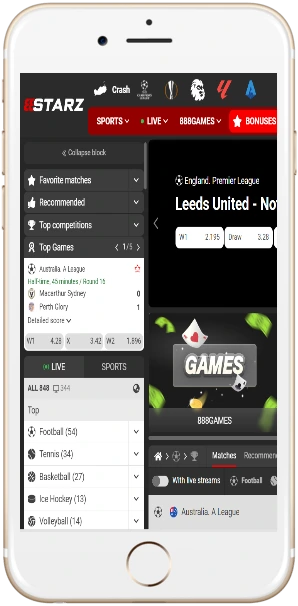
Android vs iOS versions
Both platforms provide access to the same games, odds, features, but installation methods differ based on your operating system.
| Feature | Android App | iOS Web App |
|---|---|---|
| Installation method | APK download from website | Add to home screen via Safari |
| File size | 12.4 MB | No download required |
| System requirements | Android 5.0 or higher | iOS 12.0 or higher, Safari browser |
| Update process | Manual APK re-download | Automatic via browser cache |
| Push notifications | Yes, native support | Yes, through browser permissions |
| Loading speed on 4G | Under 2 seconds average | 2-3 seconds average |
The Android version loads games 15-20% faster than the iOS web app, particularly noticeable when switching between live betting markets during matches. However, iOS users benefit from automatic updates without needing to re-download APK files.
How to install on your device
Installation takes 2-3 minutes for Android, under 1 minute for iOS.
Android installation steps
- Open Chrome on your Android phone, visit 888starz-kenya.com
- Tap "Download App" button on homepage or navigate to App section
- Go to Settings → Security → enable "Unknown Sources" (allows APK installation from outside Google Play)
- Tap downloaded APK file in notifications or Downloads folder
- Confirm installation when prompted — the app installs automatically within 30-45 seconds
- Open app, log in with existing credentials or create new account
Some newer Android devices (Samsung Galaxy S21+, Pixel 6+) may show "Play Protect" warning; simply tap "Install Anyway" to proceed.
iOS installation steps
- Open Safari browser on iPhone or iPad, navigate to 888starz-kenya.com
- Tap Share icon (square with arrow pointing up) at bottom of screen
- Scroll down and select "Add to Home Screen"
- Name the shortcut "888starz Kenya" or any preferred name
- Tap "Add" in top right corner — an app icon appears on home screen
- Launch icon to access full-screen web app version
The iOS web app functions identically to native app but runs through Safari's engine. You won't find it in App Store due to Apple's restrictions on real-money gambling apps in Kenya.
What features does the mobile app include?
The 888starz Kenya app replicates full desktop experience with touch-optimized interfaces.
Live in-play betting
Place bets during matches with odds updating every 5-15 seconds. Mobile interface displays live scores, match timers, statistics in compact view optimized for one-handed use.
Casino game library
Access 4,000+ slots, live dealer tables, crash games through app's game browser. Search filters by provider (Pragmatic Play, Evolution, Spribe), RTP percentage, volatility level.
M-Pesa integration
Deposit and withdraw using M-Pesa without leaving the app — tap Deposit, enter amount, confirm via *840# prompt. Withdrawals process within 2-4 hours on weekdays, funds arrive directly to M-Pesa wallet.
Push notifications
Enable alerts for bet settlements, bonus offers, favorite team kickoffs, withdrawal confirmations. Customize notification preferences in Settings to receive only specific alert types (e.g., only wins over 1,000 KES).
Bet slip management
Build accumulators with up to 20 selections, apply bet builder combinations for same-game parlays, use cashout feature mid-match to secure partial winnings.
Account dashboard
View betting history, transaction logs, active bonuses, loyalty points from one central screen. Filter transactions by date range, export statements as PDF for record-keeping.
App performance on Kenyan networks
We tested the 888starz Kenya app across different network conditions typical in Nairobi, Mombasa, Kisumu.
4G/LTE performance
On Safaricom 4G in Nairobi's Westlands and CBD areas, the app loads sportsbook homepage in 1.8 seconds average, individual game pages in 1.2 seconds. Streaming live dealer games consumes roughly 40-50 MB per hour at standard quality.
3G fallback behavior
When 4G drops to 3G (common in parts of Kisumu, rural Nakuru), app automatically reduces image quality and disables auto-refresh for betting odds. Load times increase to 4-6 seconds per page.
Data consumption
Typical usage patterns show 3-5 MB per hour for standard sports betting (browsing markets, placing 10-15 bets). Playing slots consumes 8-12 MB per hour. Live dealer games use most data at 40-60 MB per hour.
Battery drain
Extended sessions (2+ hours continuous use) drain 15-20% battery on mid-range devices (Samsung Galaxy A52, Tecno Camon 18). Background notifications with app minimized consume roughly 2-3% per hour.
Mobile-only promotions
888starz Kenya offers specific bonuses for app users not available on desktop website.
App download bonus
First-time app users receive 50 free spins on Wolf Gold slot after making initial deposit of 500 shillings or more through mobile app. Free spins credit within 15 minutes, must be used within 48 hours, winnings capped at 3,000 KES with 25x wagering.
Mobile cashback boost
Weekly cashback rate increases from 10% to 15% when all bets placed exclusively via mobile app. Minimum qualifying loss remains 1,000 KES, cashback credits every Monday morning.
Accumulator insurance
Place 5+ selection accumulators via mobile app — if exactly one selection loses, receive 50% refund up to 2,000 shillings as free bet. Minimum odds per selection: 1.40.
Common installation issues
"Installation blocked" on Android
This appears when "Unknown Sources" isn't enabled. Go to Settings → Security → toggle on "Install unknown apps". On newer Android versions (10+), you must grant permission per-app — when warning appears, tap Settings and enable for Chrome.
App won't open after installing
Clear browser cache, redownload the APK file. Sometimes partial downloads corrupt the file. If problem persists after fresh download, restart your phone and try again.
iOS icon doesn't work properly
Delete home screen icon, clear Safari cache (Settings → Safari → Clear History and Website Data), then re-add web app. Make sure you're using Safari specifically — Chrome and Firefox on iOS don't support proper web app functionality.
Login credentials not working
Use same phone number/email and password from your desktop account — mobile and desktop share one unified account system. If you forgot password, tap "Forgot Password" and follow SMS reset instructions.